Sample records · Concept presentation, not a verified ERP screen.
01 · TemplateCanvas design
02 · RecipientsStudent workflow
03 · OutputSingle or bulk printing
Why your school needs this
Isthecertificatedesigned—orreadytoprint?
The school prepares a certificate layout, then follows the separate single or bulk printing workflow. Designing a template is not issuing a certificate.
Certificate Design Studio
Thecompletecertificateworkspace.
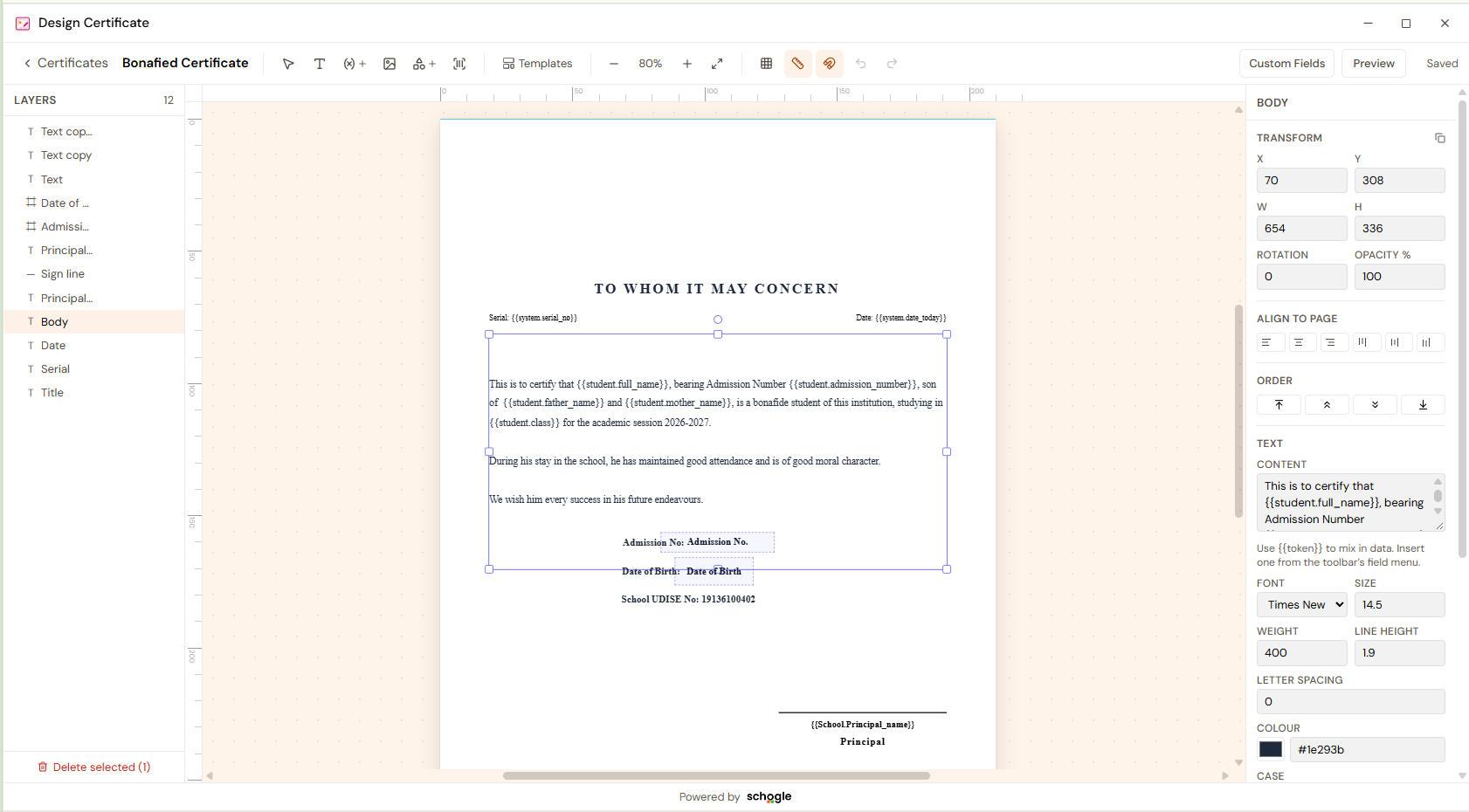
Design Studio · Bonafide Certificate
01 · Layers
Find the title, body, serial, date and signature elements in one ordered list.
02 · Certificate canvas
See the complete document with rulers, guides and the selected text area.
03 · Element properties
Refine position, dimensions, alignment, order and text formatting beside the page.
01Canvas certificate editor
Schoolcertificate
The school prepares a certificate layout, then follows the separate single or bulk printing workflow. Designing a template is not issuing a certificate. Canvas certificate editor is the part of certificate studio that supports this task. Certificates prepared through the documented canvas-to-print workflow.
Template — Canvas design
Recipients — Student workflow
Output — Single or bulk printing
For school administrators
Certificates prepared through the documented canvas-to-print workflow.
School document studios
Student · Sample student 01
Canvas certificate editor
Canvas certificate editorSample School · Record preview
Template
Canvas design
Recipients
Student workflow
Output
Single or bulk printing
Template · Canvas designSample school record
Sample records · Concept presentation, not a verified ERP screen.
02Design Certificate
Schoolcertificate
The school prepares a certificate layout, then follows the separate single or bulk printing workflow. Designing a template is not issuing a certificate. Design Certificate is the part of certificate studio that supports this task. Certificates prepared through the documented canvas-to-print workflow.
Template — Canvas design
Recipients — Student workflow
Output — Single or bulk printing
For school administrators
Certificates prepared through the documented canvas-to-print workflow.
School document studios
Student · Sample student 01
Design Certificate
Design CertificateSample School · Record preview
Template
Canvas design
Recipients
Student workflow
Output
Single or bulk printing
Template · Canvas designSample school record
Sample records · Concept presentation, not a verified ERP screen.
03Single printing
Schoolcertificate
Use single printing to review or prepare the recorded information from certificate studio. School certificate remains the subject of the review, so the output stays connected to the school task rather than becoming a separate register.
Template — Canvas design
Recipients — Student workflow
Output — Single or bulk printing
For school administrators
Prepare the certificate studio records for the next school review.
School document studios
Record area · Certificate Studio
Single printing
Single printingSample School · Record preview
Template
Canvas design
Recipients
Student workflow
Output
Single or bulk printing
Template · Canvas designSample school record
Sample records · Concept presentation, not a verified ERP screen.
04Bulk printing
Schoolcertificate
Use bulk printing to review or prepare the recorded information from certificate studio. School certificate remains the subject of the review, so the output stays connected to the school task rather than becoming a separate register.
Template — Canvas design
Recipients — Student workflow
Output — Single or bulk printing
For school administrators
Prepare the certificate studio records for the next school review.
School document studios
Record area · Certificate Studio
Bulk printing
Bulk printingSample School · Record preview
Template
Canvas design
Recipients
Student workflow
Output
Single or bulk printing
Template · Canvas designSample school record
Sample records · Concept presentation, not a verified ERP screen.
Connected school responsibilities
Schooldocumentswithasharedinstitutionalidentity.
Keep each document format close to the student, fee or examination workflow it belongs to.
School administrators
Choose the document
Accounts teams
Prepare the design and data
Academic coordinators
Print or export
Before your school gets started
Aclearerworkflow. Aconsiderednextstep.
What does certificate studio cover?
Design and print certificates in the student workflow. Its documented capabilities include Canvas certificate editor, Design Certificate, Single printing, Bulk printing.
Who benefits from this workflow?
School administrators, Accounts teams, Academic coordinators. Certificates prepared through the documented canvas-to-print workflow.
What should we confirm in a demo?
Review supported screens, configuration and current availability with your school’s responsible team.
 School document studios